
When doing App development in the software industry, we have three types of design patterns – MVC vs MVP vs MVVM.
Design patterns are a great way to reinforce the best practices in software development. They help us structure our applications so that they are easier to maintain and evolve while making sure we have modularity, cohesion, and dependency injection.
But with so many design patterns floating around the software industry, it can be difficult to know which ones are most relevant to your projects. That’s why we are here today- to break down for you the differences between these three design patterns!
On the surface, these three patterns might seem very similar. They all involve a user interface and a controller that interacts with the user interface in one way or another.
However, in reality, these types of design patterns have different use cases and should not be used when situations dictate the need for something other than what they offer.
Learn more about when to implement each type of pattern in this article! In this article, we are going to do an MVC Vs MVP Vs MVVM comparison to find out their specialty features.
All the design patterns play a very important role in developing applications as best practices that are easy to test, maintain, and loosely combined. Also, these patterns provide the facility to separate the User interface(UI) from the business logic.
Main Features of Design Patterns
- It removes the boilerplate code
- Easy to Test & Maintain the code
- Time-saving or less time consuming
- Build a more responsive and error-free application
- Separate the UI and business logic
Design patterns are utilized to solve common problems like how the objects are going to interact with an application. A pattern isn’t an actual design but more like a framework to simplify the creation of the app.
How much do web developers make in Vietnam?
Though Android app development doesn’t seem tough, it is a little complicated for starters and takes some time to get the finished product. To get rid of these complexities, companies often tend to use their design patterns initially instead of full-fledged development to ease out their work.
Design patterns are a solution to a recurring problem in software design. A pattern is a tried and tested solution to a particular problem, which you can use and adapt for your own needs. The following article will introduce you to the most common of these patterns, explaining what each looks like and when they’re ideally used.
To begin with, we will see a brief description of all the patterns separately-
Key Summary
- Overview: MVC (Model-View-Controller), MVP (Model-View-Presenter), and MVVM (Model-View-ViewModel) are software design patterns that separate concerns in application development, enhancing modularity, scalability, and team collaboration.
- MVC (Model-View-Controller): Definition: Divides application logic into three components: Model (data), View (UI), and Controller (logic mediator). Components: Model: Manages data and database interactions (e.g., add, update, select). View: Displays data to the user (e.g., HTML, XML). Controller: Handles user input, mediates between Model and View. Benefits: Enables parallel development (e.g., UI and database teams work separately); pioneered in Smalltalk-80. Use Case: Suited for large-scale apps with distributed team tasks.
- Definition: Divides application logic into three components: Model (data), View (UI), and Controller (logic mediator).
- Components: Model: Manages data and database interactions (e.g., add, update, select). View: Displays data to the user (e.g., HTML, XML). Controller: Handles user input, mediates between Model and View.
- Model: Manages data and database interactions (e.g., add, update, select).
- View: Displays data to the user (e.g., HTML, XML).
- Controller: Handles user input, mediates between Model and View.
- Benefits: Enables parallel development (e.g., UI and database teams work separately); pioneered in Smalltalk-80.
- Use Case: Suited for large-scale apps with distributed team tasks.
- MVP (Model-View-Presenter): Definition: A derivative of MVC where the Presenter acts as a middleman, handling all presentation logic. Components: Model: Defines business logic and data rules. View: Handles UI interactions (e.g., XML, Activity) without business logic. Presenter: Processes user input from View, interacts with Model, and updates View. Benefits: Clear separation of concerns; View and Presenter interact via interfaces, enhancing testability. Use Case: Ideal for applications needing robust UI testing and decoupled logic.
- Definition: A derivative of MVC where the Presenter acts as a middleman, handling all presentation logic.
- Components: Model: Defines business logic and data rules. View: Handles UI interactions (e.g., XML, Activity) without business logic. Presenter: Processes user input from View, interacts with Model, and updates View.
- Model: Defines business logic and data rules.
- View: Handles UI interactions (e.g., XML, Activity) without business logic.
- Presenter: Processes user input from View, interacts with Model, and updates View.
- Benefits: Clear separation of concerns; View and Presenter interact via interfaces, enhancing testability.
- Use Case: Ideal for applications needing robust UI testing and decoupled logic.
- MVVM (Model-View-ViewModel): Definition: Facilitates UI development with two-way data binding between View and ViewModel, reducing View dependency on Model. Components: Model: Manages data and business logic, similar to MVC. View: Displays data as a graphical interface. ViewModel: Abstracts View, wraps Model data, and provides commands to update Model. Benefits: Combines MVC and MVP strengths; data binding enhances compatibility and maintainability. Use Case: Best for apps with complex UIs and dynamic data (e.g., AngularJS, HTML5 apps).
- Definition: Facilitates UI development with two-way data binding between View and ViewModel, reducing View dependency on Model.
- Components: Model: Manages data and business logic, similar to MVC. View: Displays data as a graphical interface. ViewModel: Abstracts View, wraps Model data, and provides commands to update Model.
- Model: Manages data and business logic, similar to MVC.
- View: Displays data as a graphical interface.
- ViewModel: Abstracts View, wraps Model data, and provides commands to update Model.
- Benefits: Combines MVC and MVP strengths; data binding enhances compatibility and maintainability.
- Use Case: Best for apps with complex UIs and dynamic data (e.g., AngularJS, HTML5 apps).
- Key Differences: Performance: MVP offers high UI reliability and low rendering issues; MVVM’s data binding may impact complex tasks. Compatibility: MVVM excels due to data binding; MVP outperforms MVC, which faces restating issues. Modifiability: MVVM and MVP require fewer changes, with MVVM prioritizing maintainability; MVC often needs more modifications. References: MVC View lacks Controller reference; MVP View references Presenter; MVVM View references ViewModel. Entry Point: Controller (MVC), View (MVP, MVVM). Languages: MVC (ASP.Net, Smalltalk); MVP (Windows Forms); MVVM (HTML5, AngularJS).
- Performance: MVP offers high UI reliability and low rendering issues; MVVM’s data binding may impact complex tasks.
- Compatibility: MVVM excels due to data binding; MVP outperforms MVC, which faces restating issues.
- Modifiability: MVVM and MVP require fewer changes, with MVVM prioritizing maintainability; MVC often needs more modifications.
- References: MVC View lacks Controller reference; MVP View references Presenter; MVVM View references ViewModel.
- Entry Point: Controller (MVC), View (MVP, MVVM).
- Languages: MVC (ASP.Net, Smalltalk); MVP (Windows Forms); MVVM (HTML5, AngularJS).
- Why MVVM Over MVC?: Reduces View dependency on Model via two-way data binding. Enhances maintainability and compatibility for modern, dynamic UIs. Simplifies complex UI development with minimal changes.
- Reduces View dependency on Model via two-way data binding.
- Enhances maintainability and compatibility for modern, dynamic UIs.
- Simplifies complex UI development with minimal changes.
- Use Case: MVC suits large team-based projects; MVP is ideal for UI-intensive apps with testing needs; MVVM excels in dynamic, data-driven applications requiring flexibility and scalability.
What is MVC (Model View Controller)?
Model–view–controller (usually known as MVC) is a software design pattern commonly used for developing user interfaces that divide the related program logic into three interconnected elements.
This is done to separate internal representations of information from the ways information is presented to and accepted by the user. This kind of pattern is used for designing the layout of the page.
The MVC design pattern forms the basis for the first architectural solution of the first programming environment with a graphical user interface – Smalltalk-80.
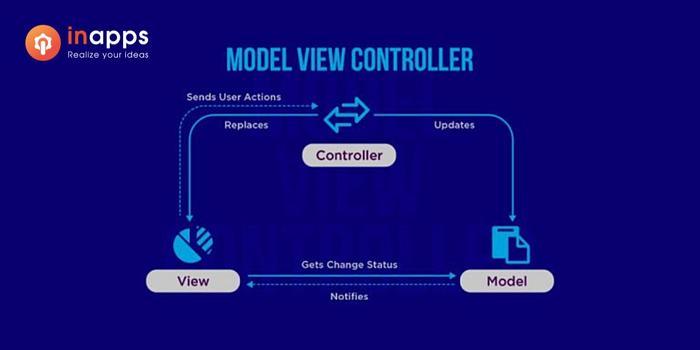
The architecture of Model-View-Controller is such that it allows you to segregate the data model, user interface, and control logic into three individual components. Since the three components are individuals, any change in a component won’t be reflected in others.
This type of architecture is well suited for those who are working on large app development projects as a team.
This is also very convenient for programmers as it helps in the quick development of apps. For example, some members could work on data models, some on the user interface, and the remaining for designing the database structure.
To put it simply, MVC helps in distributing the work within a team. This helps in improving the overall performance.
Components of MVC
- Model
- View
- Controller
Model – It basically represents the data that is to be displayed on the screen. In most cases, this refers to the communication between the databases.
This communication can be in the form of adding new data, changing existing ones, or selecting specific data. It performs operations on the raw data. The data displayed by it to the user could be in any form.
View – View is used for displaying the data taken as input by the model to the user. It represents the User Interface components like HTML and XML.
It receives at the input a set of raw data that must be transmitted to the user and formats it following the requirements of the user.
Controller – As the name suggests, the Controller is responsible for handling all the processes, that is, it is responsible for resolving all the external requests and fulfilling these requests. It takes the user’s data through the model to view, acting as a mediator between the two.
What is MVP model?
Model–view–presenter (MVP) is a derivation of the model–view–controller (MVC) architectural pattern. Since it is a derivation of MVC, it has many features similar to it. It appeared for the first time in IBM and then in Taligent during the 90s.
In MVP, the presenter assumes the functionality of the “middle-man”. In MVP, all presentation logic is pushed to the presenter.
Although MVP is a derivation of MVC, they do have their slight differences.
Components of MVP
- Model
- View
- Presenter
Model – The Model represents a set of classes that describes the business logic and data. It also defines business rules for data means how the data can be changed and manipulated.
View – View is used for making interactions with users like XML, Activity, and fragments. It has got nothing to do with the logic that is to be implemented in the process.
Presenter – It is the processing unit of the system. The presenter gets the input from the View, processes the data with the help of Model, and passes the results back to View after the processing is done.
To simplify the MVP model, the presenter responds to the input data and returns it to View after the processing is done. View and Presenter are not related to each other and interact only through the interface.
Why MVVM is better than MVC?
What is MVVM (Model–view–view model)?
Model–view–view model (MVVM) is a software architectural pattern that facilitates the separation of the development of the graphical user interface (the view) – be it via a markup language or GUI code – from the development of the business logic or back-end logic (the model) so that the view is not dependent on any specific model platform.
In other words, it supports a two-way data channel between the View and View-model. It brings together the best strengths of MVC and MVP by reducing the limitations. It is commonly used in designing the architecture of an application.
The software industry is always changing, with new development approaches arising all the time. One of the more recent approaches is MVVM, which has been developed to help developers in three key ways. We’ll go over these in detail in this article!
Components of MVVM
- Model
- View
- View-Model
Model – The model used in MVVM is similar to the model used in MVC, consisting of the basic data required to run the software.
View – View is a graphical interface between the user and the design pattern, similar to the one in MVC. It displays the output of the data processed.
View-Model – View-Model is on one side an abstraction of the View and, on the other, provides a wrapper of the Model data to be linked. That is, it comprises a Model that is converted to a View, and it also contains commands that the View can use to influence the Model.
Let’s find out MVC Vs MVP Vs MVVM, main points of differences here-
MVC Vs MVP Vs MVVM – The comparison
Design patterns are guidelines to follow when structuring and designing a webpage or computer application. Design pattern emphasizes simplicity and favorability, which helps in the development of software. This article is about listing different types of design patterns and the difference between them that we can use in our design process.
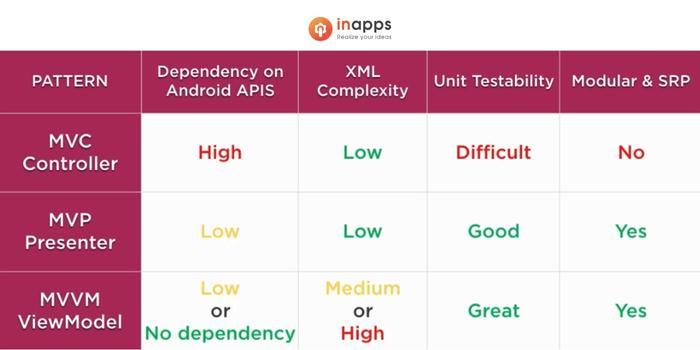
What is the difference between MVC and MVVM?
The comparison between MVC, MVP and MVVM are mentioned below-
- Performance Evaluation – When we are testing the UI performance, MVP turns out to be the one with the highest reliability and lowest hindrance when it comes to rendering frames. Data binding in MVVM creates an additional overload that could drastically affect its performance when performing complex tasks.
- Compatibility – When testing the patterns based on their compatibility, MVVM was the best of the lot due to its data binding which had a positive impact. MVP fared better than MVC, which had serious restating issues.
- Modifiability – When we talk about design patterns, it is evident that it should be modifiable since that gives us the option of adding new features and strategies into our app. Based on these factors, we observed that changes are very less in MVP and MVVM, with MVVM contributing a lot towards maintainability. MVC tends to increase the number of changes in the majority of the cases.
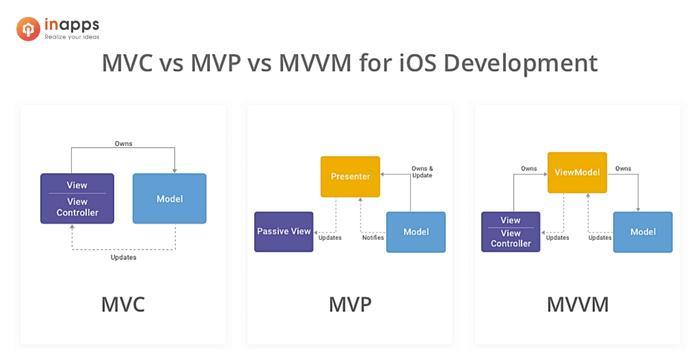
- References – In MVC, the view doesn’t have a reference to the Controller while in MVP, the view has a reference to the presenter and in MVVM, the view has reference to the view-model.
- Entry Point – For MVC, the entry point to the application is the controller whereas, for MVP and MVVM, the entry point is the view.
- Languages Used – MVC uses ASP.Net and Smalltalk. MVP uses Windows forms and MVVM uses HTML 5 with AngularJS.
Conclusion
Design patterns are the best way to simplify code and make it easier for developers to work on a project. This article intends to help students and professionals alike understand the various types of design patterns, what they are used for, and when it is best to use them.
App development has become an essential part of expanding your business. For that, you need to develop an app and the app should also be attractive and smooth in working.
We have already talked about the problem that designers usually face when it comes to choosing between a number of design patterns.
A pattern is a recurring solution to a design problem. Patterns are one of the most valuable resources in UI/UX design because they allow designers to be more creative by reusing ready-made solutions to repetitive problems.
For making apps attractive, we have design patterns like MVC, MVP, and MVVM. All these models are almost the same but differ in some features.
MVC is suitable for basic app development whereas MVP and MVVM are more suitable to use when the app needs to undergo complex operations. So, it is best to see what design pattern suits your requirement.
InApps has many experiences in developing MVPs for businesses worldwide from Startups, and SMEs to enterprises. Learn more about our MVP development service or contact us to get a free consultation.
FAQs
What are design patterns?
Design patterns are a great way to reinforce the best practices in software development.
How Design patterns are helpful?
They help us structure our applications so that they are easier to maintain and evolve while making sure we have modularity, cohesion, and dependency injection.
How to implement design patterns?
Design patterns are utilized to solve common problems like how the objects are going to interact with an application.
List of Keywords users find our article on Google
[sociallocker id=”2721″]
model view presenter vs model view controller
difference between mvc and mvvm
mvvm vs mvc
mvp software architecture
mvc vs mvvm
mvvm vs mvp
mvvm mobile development
mvc vs mvp
mvp vs mvc
mvp design pattern
mvp vs mvvm
mvp mvc mvvm
mvc mvvm mvp
mvc mvp mvvm
mvc mvp
model view viewmodel vs mvc
mvp application design
hire model view viewmodel mvvm developer
difference between mvc and mvp
mvp mvc
what is mvvm
mvvm mvp mvc
difference between mvp and mvc
difference between mvp and mvvm
mvvm mvp
mvp mvvm
mvc and mvp
model view controller vs model view presenter
mvp architectural design
what is the difference between mvc and mvvm
mvp vs mvvm android
mvc or mvvm
mvc mvvm
mvvm mvc mvp
mvvm and mvp
mvc vs mvp vs mvvm android
mvp model
model-view viewmodel vs mvc
android mvp vs mvvm
difference between mvvm and mvc
mvvc vs mvc
vs mvc
mvc, mvp
mvp and mvvm difference
mvc mvvm difference
why mvvm is better than mvc
mvvm and mvc difference
difference between mvc mvp and mvvm
mvvm mvc
mvc and mvvm design patterns
mvvm software
mvc vs mvvc
difference between mvvm and mvp
mvvm pattern vs mvc
mvc pattern vs mvvm
mvc mvp mvvm design patterns
hire mvvm developers
mvc vs mvvm android
mvp mvvm mvc
android mvc vs mvp
mvc y mvp
mvvm vs mvc vs mvp
mvvm angular
difference mvvm mvc
mvc vs mvp vs mvvm
mvp and mvc difference
mvvm and mvp difference
mvp vs mvvm vs mvc
mvc and mvvm difference
mvp and mvvm
mvc and mvvm
react mvvm or mvc
mvvm vs mvp vs mvc android
react native mvvm
react native mvp architecture
difference between mvc mvp and mvvm android
mvc vs mvvm vs mvp
mvp vs mvc vs mvvm
mvc vs mcy
mvp mvvm difference
winforms mvp
разница между mvp и mvvm
design pattern mvp
what is difference between mvc and mvvm
controller vs presenter
mvc, mvvm, mvp
difference mvc and mvvm
what is mvp model
model view presenter ios
mvvm vs mvp vs mvc
why mvvm is better than mvp
mvp controller
mvp development pattern
mvp vs mvc architecture
diff between mvc and mvvm
asp net mvp architecture
mvp model view presenter
mvvm mvc difference
الفرق بين mvc و mvvm
mvc vs mvvm architecture
mvc ou mvvm
mvvm in react native
mvvm presenter
android mvvm vs mvp
presenter design pattern
react native mvvm example
[/sociallocker]
Rate this post
Related Articles
How much do web developers make in Vietnam?

Hire Offshore Angular Developers: The Right Development Team In Vietnam
Hire Full-Stack Developers From Software Outsourcing Companies in 2026
Want to apply these insights?
Our AI architects offer free 45-minute consultations to discuss your specific use case.
Book a Discovery Call