
Unity game development is used for creating games, apps, ads, interactive stories and art, visualizations, films, etc. Games are fascinating to play, they help to pass time, increase focus, and reduce stress.
Almost everyone is fascinated with playing games. Especially these days, we have games available in multiple genres, scenarios, and multiple viewing angles, making the whole gaming experience to another level of excitement and fun.
But we forget the big question in all this- How are games developed and what mechanics goes into making a game what it is?
In this article, we are going to discuss how games are developed, especially in Unity since it enjoys unanimous popularity in game development.
Before developing games you should have a basic idea of programming languages it will help you in understanding the curve of learning game development – Programming Languages For Beginners. Let’s start!
Key Summary
- Overview: The article by InApps Technology details the core features of Unity 3D, a leading game development engine, focusing on its user interface and editor windows that facilitate asset management, scene editing, and rendering for creating 2D/3D games and interactive experiences.
- Key Features of Unity 3D: 1. Interface/Window: Description: The main Unity 3D editor window comprises multiple rearrangeable sub-windows, allowing flexible customization. Functionality: Sub-windows can be moved, docked, or undocked within the main interface, enhancing workflow efficiency. 2. Project Window: Description: Displays all project assets (e.g., images, music, scripts) available for use. Features: Lists imported assets for easy access. Includes a Favorites section for frequently used items, reducing search time. Use Case: Organizes assets for quick integration into game development. 3. Scene View: Description: Allows navigation and editing of game scenes in 2D or 3D perspectives. Features: Enables object positioning and scene manipulation. Provides visual feedback for scene layout and design. Use Case: Essential for designing and adjusting game environments. 4. Hierarchy Window: Description: Lists all objects in the game scene, organized by importance and relationships. Features: Displays parent-child object relationships (e.g., a parent object with attached child objects). Reflects the structural hierarchy of scene elements. Use Case: Manages object organization and dependencies within a project. 5. Inspector Window: Description: Provides detailed inspection of selected objects’ properties and components. Features: Allows modification of object attributes (e.g., position, scale, scripts). Displays component settings for fine-tuning. Use Case: Critical for customizing and debugging individual game elements. 6. Toolbar Window: Description: Contains essential tools for scene editing and editor management. Features: Left side: Tools for manipulating objects in Scene View (e.g., move, rotate, scale). Right side: Access to Unity Cloud Services, Unity Account, visibility menu, and editor layout options. Use Case: Streamlines scene editing and provides quick access to Unity services. 7. Game View: Description: Renders the game as it will appear to end users. Features: Simulates final game output from the player’s perspective. Allows testing of visuals, interactions, and performance. Use Case: Validates game appearance and functionality during development. 8. Materials and PBR (Physically-Based Rendering): Description: PBR is a rendering engine in Unity for realistic material visuals. Features: Enhances material appearance with lifelike lighting and textures. Requires 3D modeling knowledge for effective use. Use Case: Creates visually immersive game environments and assets.
- 1. Interface/Window: Description: The main Unity 3D editor window comprises multiple rearrangeable sub-windows, allowing flexible customization. Functionality: Sub-windows can be moved, docked, or undocked within the main interface, enhancing workflow efficiency.
- Description: The main Unity 3D editor window comprises multiple rearrangeable sub-windows, allowing flexible customization.
- Functionality: Sub-windows can be moved, docked, or undocked within the main interface, enhancing workflow efficiency.
- 2. Project Window: Description: Displays all project assets (e.g., images, music, scripts) available for use. Features: Lists imported assets for easy access. Includes a Favorites section for frequently used items, reducing search time. Use Case: Organizes assets for quick integration into game development.
- Description: Displays all project assets (e.g., images, music, scripts) available for use.
- Features: Lists imported assets for easy access. Includes a Favorites section for frequently used items, reducing search time.
- Lists imported assets for easy access.
- Includes a Favorites section for frequently used items, reducing search time.
- Use Case: Organizes assets for quick integration into game development.
- 3. Scene View: Description: Allows navigation and editing of game scenes in 2D or 3D perspectives. Features: Enables object positioning and scene manipulation. Provides visual feedback for scene layout and design. Use Case: Essential for designing and adjusting game environments.
- Description: Allows navigation and editing of game scenes in 2D or 3D perspectives.
- Features: Enables object positioning and scene manipulation. Provides visual feedback for scene layout and design.
- Enables object positioning and scene manipulation.
- Provides visual feedback for scene layout and design.
- Use Case: Essential for designing and adjusting game environments.
- 4. Hierarchy Window: Description: Lists all objects in the game scene, organized by importance and relationships. Features: Displays parent-child object relationships (e.g., a parent object with attached child objects). Reflects the structural hierarchy of scene elements. Use Case: Manages object organization and dependencies within a project.
- Description: Lists all objects in the game scene, organized by importance and relationships.
- Features: Displays parent-child object relationships (e.g., a parent object with attached child objects). Reflects the structural hierarchy of scene elements.
- Displays parent-child object relationships (e.g., a parent object with attached child objects).
- Reflects the structural hierarchy of scene elements.
- Use Case: Manages object organization and dependencies within a project.
- 5. Inspector Window: Description: Provides detailed inspection of selected objects’ properties and components. Features: Allows modification of object attributes (e.g., position, scale, scripts). Displays component settings for fine-tuning. Use Case: Critical for customizing and debugging individual game elements.
- Description: Provides detailed inspection of selected objects’ properties and components.
- Features: Allows modification of object attributes (e.g., position, scale, scripts). Displays component settings for fine-tuning.
- Allows modification of object attributes (e.g., position, scale, scripts).
- Displays component settings for fine-tuning.
- Use Case: Critical for customizing and debugging individual game elements.
- 6. Toolbar Window: Description: Contains essential tools for scene editing and editor management. Features: Left side: Tools for manipulating objects in Scene View (e.g., move, rotate, scale). Right side: Access to Unity Cloud Services, Unity Account, visibility menu, and editor layout options. Use Case: Streamlines scene editing and provides quick access to Unity services.
- Description: Contains essential tools for scene editing and editor management.
- Features: Left side: Tools for manipulating objects in Scene View (e.g., move, rotate, scale). Right side: Access to Unity Cloud Services, Unity Account, visibility menu, and editor layout options.
- Left side: Tools for manipulating objects in Scene View (e.g., move, rotate, scale).
- Right side: Access to Unity Cloud Services, Unity Account, visibility menu, and editor layout options.
- Use Case: Streamlines scene editing and provides quick access to Unity services.
- 7. Game View: Description: Renders the game as it will appear to end users. Features: Simulates final game output from the player’s perspective. Allows testing of visuals, interactions, and performance. Use Case: Validates game appearance and functionality during development.
- Description: Renders the game as it will appear to end users.
- Features: Simulates final game output from the player’s perspective. Allows testing of visuals, interactions, and performance.
- Simulates final game output from the player’s perspective.
- Allows testing of visuals, interactions, and performance.
- Use Case: Validates game appearance and functionality during development.
- 8. Materials and PBR (Physically-Based Rendering): Description: PBR is a rendering engine in Unity for realistic material visuals. Features: Enhances material appearance with lifelike lighting and textures. Requires 3D modeling knowledge for effective use. Use Case: Creates visually immersive game environments and assets.
- Description: PBR is a rendering engine in Unity for realistic material visuals.
- Features: Enhances material appearance with lifelike lighting and textures. Requires 3D modeling knowledge for effective use.
- Enhances material appearance with lifelike lighting and textures.
- Requires 3D modeling knowledge for effective use.
- Use Case: Creates visually immersive game environments and assets.
- Benefits: Flexibility: Customizable interface and windows adapt to developer workflows. Efficiency: Organized asset management (Project Window) and quick inspections (Inspector Window) speed up development. Realism: PBR enhances visual quality for modern game standards. Cost Efficiency: Offshore development in Vietnam ($20-$50/hour via InApps Technology) saves 20-40% compared to U.S./EU rates ($80-$150/hour).
- Flexibility: Customizable interface and windows adapt to developer workflows.
- Efficiency: Organized asset management (Project Window) and quick inspections (Inspector Window) speed up development.
- Realism: PBR enhances visual quality for modern game standards.
- Cost Efficiency: Offshore development in Vietnam ($20-$50/hour via InApps Technology) saves 20-40% compared to U.S./EU rates ($80-$150/hour).
- Challenges: Learning Curve: Mastering PBR and Unity’s interface requires familiarity, especially for 3D modeling or complex scenes. Resource Intensity: High-quality rendering (e.g., PBR) may demand significant computational resources. Window Management: Rearranging multiple windows can be overwhelming for beginners.
- Learning Curve: Mastering PBR and Unity’s interface requires familiarity, especially for 3D modeling or complex scenes.
- Resource Intensity: High-quality rendering (e.g., PBR) may demand significant computational resources.
- Window Management: Rearranging multiple windows can be overwhelming for beginners.
- Use Cases: Developing 2D/3D mobile or PC games with Scene and Game Views for design and testing. Creating interactive simulations or VR/AR experiences using PBR for realistic visuals. Prototyping game mechanics with quick asset integration via Project Window.
- Developing 2D/3D mobile or PC games with Scene and Game Views for design and testing.
- Creating interactive simulations or VR/AR experiences using PBR for realistic visuals.
- Prototyping game mechanics with quick asset integration via Project Window.
- InApps Technology’s Role: Offers expertise in Unity 3D development, delivering high-quality games and interactive applications. Leverages Vietnam’s 200,000+ IT professionals, providing cost-effective rates ($20-$50/hour) for global clients. Supports Agile workflows with tools like Jira, Slack, and Zoom for transparent collaboration (GMT+7).
- Offers expertise in Unity 3D development, delivering high-quality games and interactive applications.
- Leverages Vietnam’s 200,000+ IT professionals, providing cost-effective rates ($20-$50/hour) for global clients.
- Supports Agile workflows with tools like Jira, Slack, and Zoom for transparent collaboration (GMT+7).
- Recommendations: Utilize Project and Hierarchy Windows for efficient asset and object management. Leverage Scene and Game Views for iterative design and user-focused testing. Invest in PBR training to maximize visual quality in 3D projects. Partner with InApps Technology for expert Unity 3D development, harnessing Vietnam’s skilled talent for cost-effective, high-quality game solutions.
- Utilize Project and Hierarchy Windows for efficient asset and object management.
- Leverage Scene and Game Views for iterative design and user-focused testing.
- Invest in PBR training to maximize visual quality in 3D projects.
- Partner with InApps Technology for expert Unity 3D development, harnessing Vietnam’s skilled talent for cost-effective, high-quality game solutions.
Unity Game Development
Unity game development has an integrated development environment and is a worldwide recognized platform for interactive games development. With its efficient prototyping ability, unity 3D game development has become the first choice for developing interactive and exhilarating gaming solutions.
Examples of top games made via unity game development are:
- Kerbal Space Program
- Hearthstone- Heroes of warcraft
- Wasteland 2
- Battlestar Galactica Online
- Rust
- Temple Run Trilogy
- Escape plan
- Pokemon Go
- Super Mario Run
- Satellite Run
- Assasin’s Creed-Identity
- Subway surfers
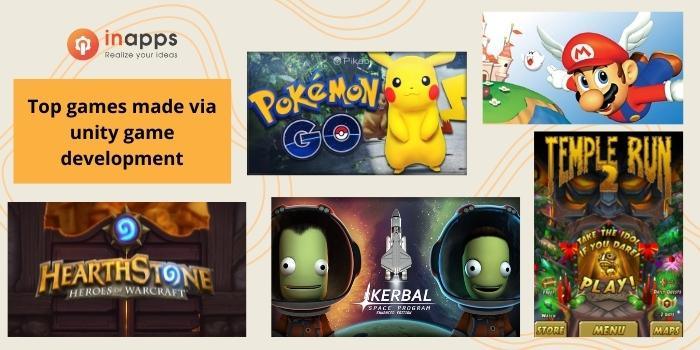
Examples of top unity game development
The list is endless!
But before jumping into the discussion of Unity, let us discuss game development:
Also read: Top Engines For Game Development
What is Game Development?
Game development, production, or design is a process that starts from an idea or concept. Often the idea is based on a modification of an existing game concept. The game idea may fall within one or several genres.
According to Wikipedia– Game Development is the process of developing a video game. The effort is undertaken by a developer, ranging from a single person to an international team dispersed across the globe. The development of traditional commercial PC and console games is normally funded by a publisher and can take several years to reach completion
Different companies have different formal procedures/ philosophies regarding game design and development. Designers often experiment with different combinations of genres.
Indie games usually take less time and money and can be produced by individuals and smaller developers. The development is usually done by using game engines like Unreal and Unity.
A game designer generally writes an initial game proposal document, that describes the basic concept, game play, feature list, setting and story, target audience, requirements, and schedule, and finally staff and budget estimates before starting the game development procedure.
Two Perspectives from DockerCon – InApps Technology 2022
Now that we have described game development, let us look at the Unity game engine-
What is Unity?

Unity is so much more than the world’s best real-time development platform – it’s a robust ecosystem designed to enable success. Unity is a cross-platform game engine developed by Unity Technologies.
It can be used to create three-dimensional, two-dimensional, virtual reality, and augmented reality games, as well as simulations and other experiences.
Following are the main features:
- Unity gives the ability to create games and experiences in both 2D and 3D and the engine offers a primary scripting API in C# (for both the Unity editor in the form of plugins and games themselves).
- Also, it provides drag and drops functionality as well.
- It has a large community of users that keep it constantly updated.
- It has a powerful interface that is used in developing games and their cross-platform applications.
Unity is a great tool for prototyping everything from games, to interactive visualizations
Why use Unity?
1. For developing games – Unity is the most popular software when it comes to game development. It provides you with an untouched product that possesses good documentation and can be used to build games of any genre. Unity is simple to use and provides the best game development experience.
2. To create better user experiences – As we know, Unity is a great game engine. This is mostly due to its beautiful graphics and ability to render in 3D. Unity extends its support to VR and AR. Therefore, it could become a great tool for exploring architecture and automation.
3. For interactive experiences – Unity is very versatile when it comes to creating interactive applications. Its extensibility makes it possible to integrate into whatever existing back ends the applications have.
Elements of Unity
There is a set of elements that are used to develop a game in the Unity game engine. Let us discuss them and their functions in the game development-
Assets – Assets are basically the project item(s) that can be brought into play in the game or project. An asset can be a file imported from outside of Unity, sound file, images (jpeg, gif, png, etc), textures, or any of the other file types which are supported by Unity. There is also a set of asset-types that can be generated within Unity.

The Project – Project in Unity is a folder that contains the entire game project, along with which it contains the assets associated with the project.
GameObject – In simple terms, GameObject is nothing but each and every project that exists within the game or project. Technically, they don’t append any functionality to your game project but merely acts as holders for components like the Transform, Light, Script, and RigidBody components. Technically, they don’t provide any new features or functions to your game or project but merely act as holders for components.
Components – Components are the fundamental blocks i.e. the nuts and bolts of objects and their activities in the game. They act as functional entities for the GameObjects. By default, every GameObjects has a Transform Component that is set automatically. This is due to the fact that it decides where the GameObject is positioned within the Unity environment.
Scenes – A Scene can be defined as the base. where you can position your GameObjects to create a level of your game or project. One or more scenes (aka, levels) are generally put into a game. These scenes ar linked together for your audience, clearing which they would go to the next level. This helps in making the game long as well as interactive for the users.

Prefab – Prefabs are reusable or recyclable components of the game that are present in the Project View window. It can be introduced into as many scenes as you want. You can generate an instance of the Prefabs in your game that is linked to the main Prefab.
Features of Unity 3D
Now that we have discussed the elements of Unity 3D, let us talk about the features of Unity.
Interface/Window
This is present in the main editor of the window. The window of Unity 3D is made up of many small individual windows that are rearrangeable. It can be removed from one position and appointed to another position very easily within the main window.

Project Window

It will display the list of all the assets that are available for use and images, music files, and other additional files you will implement in your project. Assets of the game or project appear in this window when you import them from the project.
In Project View, there is a Favourite section where the items commonly used by you are stored. Therefore, you wouldn’t need to search and select them from any other section.
Scene View

It allows the developers to navigate the game view and allows them to edit the game scene created by you. It is capable of providing 2D as well as 3D view to the animators. It allows you to change the position of the object and position it correctly.
Hierarchy Window
In this window, the available objects in the game are arranged in the order of their importance. It reveals the formation of attachments of objects with one another. This window acts as a Parent Object. Therefore, the objects added to it become their Child Object.
Inspector Window

The Inspector Window does exactly what its name suggests. It allows the developers to inspect the selected object.
Toolbar Window

Toolbar Window is an important window in the Unity Editor. On the left of the window, you will notice the primary tools that are used for editing the scene view with the objects contained within it.
The important functions of viewing are available in the mentioned window. You can also get access to the Unity Cloud Services using the buttons on the right side and the Unity Account as well, plus the visibility menu & the editor layout menu that will provide some alternating layout for editor-windows.
Game View
The purpose of this window is to process the render in the game. This view gives you an overall view on how your game will look from the user’s point of view.
Materials and PBR
PBR is a short form for Physically-based rendering. PBR is basically used as the rendering engine which enables the materials. For working with this, you would need to have the knowledge of 3D Modeling.
Advantages of Unity Game Development
We have discussed a lot regarding Unity till now, about its components and features but it is necessary for us to know its advantages as well. We should know what benefits we are getting by using Unity over other game engines.
The Present State of Container Orchestration – InApps 2025
1. Platform Support – This is one of the biggest advantages of Unity. It is compatible with platforms like Windows, macOS, iOS, Linux, Android, and many other platforms. Due to multiple platform support, the app developed in one platform can be easily shared with the other platforms. Besides, its methodology allows for speedy prototyping, which in turn reduce the time required to develop apps
2. IDE – The engine consists of an in-built IDE which is used to write the project code. Additionally, the integrated development editor supports programming languages like JScript or C# for scripting. Along with this, it provides features that are suitable for game development.
3. Debugging – Debugging in Unity is a pleasure for every game developer. The support for debugging is nice because all the variables are displayed in the gameplay.
4. Graphics – It supports high-quality audio and visual effects that support easing the game development. The visuals are capable of adapting to every screen and device.
5. Community – Unity enjoys the support of a large community of users that keep the engine updated and offer wide built components for sound, physics, rendering, and controls.
6. Analytics – Unity consists of built-in analytics which you can easily find in the editor. Thanks to Unity Analytics, you can get very deep insights into your game. It gives you information that can be used to improve the gameplay by doing some modifications and offer an awesome gaming experience for the players.
Many leading experts in the gaming industry have speculated that the next big thing in gaming is wearable gaming.
InApps has much experience in developing game apps for clients worldwide. Learn more about future trends of gaining industry or contact us to realize your game app idea.
FAQ
What programming language does unity use? What coding language does unity use?
Unity uses C# as the scripting language for both the Unity editor in the form of Plugins and games. Before C#, it used a language known as Boo which was removed with the release of Unity 5. It also uses a Javascript language known as Unity Script. Unity takes your C#/ JS/Boo code and compiles it to run on iOS, Android, PC, Mac, Xbox, PS3, Wii, or web plugin.
Depending on the platform that might end up being Objective C or something else, but that’s completely transparent to you. There’s really no benefit to knowing Objective C; you can’t program in it.
Is unity a programming language?
Unity is a game engine developed by Unity Technologies. It is one of the most widely used engines in the game development industry. Since it is a cross-platform engine, it can be used to create games for different platforms like Windows, iOS, Linux, and Android.
[sociallocker id=”2721″]
List of Keywords users find our article on Google:
unity 3d
unity game development
unity technologies
unity mobile app development
unity games
unity analytics
unity game developer
unity game engine
unity for app development
unity developer jobs
unity software
unity mobile development
unity android development
unity scripting
jobs unity developer
hire unreal developer
unity gameobject position
unity.com
unity app development
unity app
multi genre portfolio examples
knowunity
unity c# list
android game development unity
unity sound effects
unity3d game developer
unity 3d architecture
visual scripting unity
unity cross
unity software development
prefab unity
unity list of gameobjects
unity prefab
assets unity
android development unity
animator unity
unity 3d environment
unity automotive
unity editor scripting
unity ios development
unity3d jobs
the unity cross
subway surfers top run
how to create assets for unity
unity list find
best unity games
unity prefab ui
automation game engines
unity programming
unity ios
unity 3d games
find unity developers
scripting in unity for beginners
unity plugins
c# game development
unity api request
unity web ar
unity level editor
game design
unity 3d 2022
linkedin learning unity
unity game design software
unity game creation
unity set parent
unity gameobject
rigidbody unity
unity gif
unity editor
scene template unity
unity change scene
how to make a game like subway surfers in unity
unity gameobjects
unity 3d touch
unity 3d jobs
unity custom editor
create gameobject unity
buttons unity
unity 3d games net
unity set
analytics unity
unity 3d developer jobs
unity render
development build unity
what is game development
best ide for unity
kerbal eve
find object of type unity
unity cloud build
variables unity
unity ios games
unity programming for beginners
set parent unity
offshore company wikipedia
unity c#
unity get component in parent
unity graphic jobs
apps made in unity
unity 3d app
basic unity game
how to add assets to unity
how to put ads in unity games
unity game over screen
unity 2d audio
unity get unique device id
unity cloud
unity recruitment
unity games for android
unity game engine android
unity game development company
window unity
unity engine ios
unity find object with name
unity ide
visual effects unity
unity development linux
unity c# documentation
unity play audio
c++ unity
unity game end
platform game unity
unity input documentation
unity sound
unity development team
unity technologies jobs
unity android game development
unity how to change scene
unity display text
unity platform game
unity visual scripting
unity component enabled
gaming recruitment solutions
unity add sound
unity 3d graphics
unity c# api
unity 3d architectural
unity create component
unity development group
unity 2d game development
hire unreal engine developers
unity3d platforms
initial unity
unity end game
unity frame rate
unity interface
creating mobile games with unity
unity game engine linux
unity technologies careers
unity ar game
unity3d web games
skybox unity
unity 3d professional
unity gizmo
unity mobile game development
3 d unity
unity3d application
unity knowledge base
unity game engine system requirements
unity find all objects with interface
game programming formation
unity 2d game
game development jobs
3d games unity
unity games 2022
unity game making software
unity game development app
unity technologies news
unity get center of multiple objects
game design wikipedia
unity game app
unity get center of screen
unity object position
what is prefab in unity
unity for game development
unity get position of gameobject
how to make a story game in unity
unity 3d news
wikipedia battlestar galactica
does unity support visual studio 2022
get position of gameobject unity
kerbal space program wiki
unity get component
unity get parent gameobject
unity3d com
com.unity.entities
find object unity
get child gameobject unity
how to make a game app in unity
unity create gameobject in code
unity environment assets
unity game programmer jobs
unity make object render on top of everything
access gameobject from script unity
battlestar galactica phone case
unity technologies wiki
unity transform position
unity 3d api
unity what is a prefab
unity gameobject get parent
how to enable a gameobject unity
transform.position unity
unity default ide
unity set position
unity create gameobject
unity project templates
find gameobject in child unity
unity touch input
unity create a list of gameobjects
get world position unity
unity find object in child
unity get child by name
unity prefabs
unity scripting reference
get transform of gameobject unity
temple recommend holders
unity find child gameobject by name
unity gameobject transform position
unity prefab icon
unity what is a gameobject
what language does unity use
android game unity
scenes unity
unity look at
kerbal space program wikipedia
pegas touristik wiki
unity get child gameobject by name
unity play
unity scenes
unity vr template
update prefab unity
how to change scenes in unity
kerbal space program language change
transform.up unity
unity components
unity input
unity play gif
script debugging unity
unity debugging
unity gameobject get position
unity setparent
what is rigidbody in unity
unity drag object with touch
unity how to change ide
unity input manager
unity variables
how to make game with unity
unity 3d android
bsg games twitter
change scene unity
unity net 6
unity scene
can unity assets be used commercially
pokemon center vietnam
scene manager unity
app in unity
materials for unity
unity script debugging build
building apps in unity
unity 2d play sound
unity c# editor
unity c++
unity enable gameobject
unity parent script
is unity available for linux
unity 3d audio
unity lookat
what language do you use in unity
lookat unity
unity core app
unity find object by name
unity gameobject find
unity rate app
unity to android
unity visual programming
unity development build
unity get object id
unity get position of child object
unity on macos
unity on scene changed
unity platformer assets
unity props
unity sound script
unity templates
unity world position
building an app in unity
new scene unity
programming in unity
unity cloud effect
unity designer
unity find component in scene
unity gameobject get all child
unity interface in inspector
unity set world position
apps unity
hire unreal engine programmer
unity feature request
unity get name of gameobject
unity mobile 2d
add child unity
how to build android game in unity
unity 3d audio play
unity asset store publisher
unity build ios on windows
unity c# android
unity change project name
unity write to file
unityengine.rendering
variables in unity
audio play unity 5
do you need unity to play unity games
game analytics unity
game manager unity
game unity
how to use unity
unity cloud services
unity editor script
unity game manager
unity gaming platform
what is unity in physics
development unity
how to make a video game unity
qc inspector jobs
sound manager unity
unity 2d level design
unity automotive design
unity for beginners
unity framework
unity technology solutions
android support unity
easy touch unity
game ideas for unity
how unity makes money
unity 3d mobile
unity api gameobject
unity learning materials
unity android debug
unity scripting documentation
unity set enabled
range unity
touch controls unity
unity 2020 new features
unity ads android
unity asset story
unity get device id
unity3d animator
2d game environment design
how to create main menu in unity
unity environment lighting script
unity 2d platform
unity3d consultants
2d games made with unity
game programming in unity
outsource real estate image editing vietnam
sounds for unity
unity 2d games
unity ads admin
unity editor folder
unity write to console
unity3d ios development
game environment concept design
game programming unity
how many stores is unity carried in
how to program in unity
instance unity
subway surfers phone cases
unity 3d coding
unity 3dd
unity audio effects
unity build windows
unity component
unity custom inspector
unity for linux
made with unity logo
speedy hire share chat
unity game design document
unity ios development build
unity turn based game
3d audio unity
creating 2d game in unity
how to play ats in vr
unity cloud build free
unity support
c# unity programming
companies that use unity
game programming with unity
put unity game on website
unity document
unity engine ui
unity functions list
unity game programming
unity time realtime
3d game modeling jobs
eve online game engine
hire unreal engine developer
how to share unity project
mobile games in unity
source game unity
unity audio 3d
unity enable
unity games logo
unity office assets
unity user interface
unity 3d formation
unity editor linux
unity main menu asset
battlestar galactica logos
jumping into c++
unity 3d modeling
unity if development build
unity software architecture
unreal engine telegram group
best unity web games
redfox gaming
unity 3d project
unity mobile game
unity platform support
battlestar galactica model
branching video game engine
learn unity 3d game development
unity 3d 2020
unity 3d ar
unity drag and drop ui
unity engine logo
unity frame rate setting
unity start
unity teams
unity-technologies
20k budget gaming pc
augmented reality website template
how to add music unity
how to build in unity
learning unity game engine
unity 3d development
unity game development company usa
unity game engine for android
unity get global position
unity in ar
unity mac
unity pc games
vr development unity
game menu ui design
hearthstone game engine
menu in unity
subway surfers story
unity augmented reality android
unity build web
unity engine requirements
unity images
unity layers
web ar with unity
clearing hotline computer gaming
easy unity projects
games made with unity free
games using unity 5
know unity
made with unity
unity android
unity app developer
unity create with code
unity for architecture
unity jpeg
unity position
unity3d c++
vr development with unity
whatsapp interactive message template
2d platformer unity
c# game programming
c# unity developer
subway surfers t
unity console
unity custom input manager
unity developer community
unity for ar
unity render architecture
c++ game engine
indie game developer jobs
rust game engine
файл hearthstone: heroes of warcraft
creating e learning games with unity
hearthstone designer
rust game development
unity games 3d
unity outsourcing
unity3d development
unity3d frame rate
device id unity
hire unity programmer
how to build unity project
pokemon game unity
unity if scene name
unity pokemon
unity target texture
web ar unity
whatsapp api c#
ar app unity
game developer jobs
learn to code by making games unity
net game development
unity consultants
unity game source code
unity software solutions
what is unity 3d
whatsapp c#
game development ide
subway surfers play online
unit 3d game
unity 2d engine
unity code editor
unity commercial
game development c#
what is unity developer
best game engine
hire unity game developers
3d game developers
game interface design
mobile game programming
game development company
ar game development company
game design company
What to Do and What to Avoid – InApps 2022
[/sociallocker]
Rate this post
Related Articles

Want to apply these insights?
Our AI architects offer free 45-minute consultations to discuss your specific use case.
Book a Discovery Call